

Opportunity Area
For thousands of years, people have imagined shapes between the stars. Twinkle turns that instinct into something interactive: you imagine a shape, draw it, and real astronomical data brings it to life.
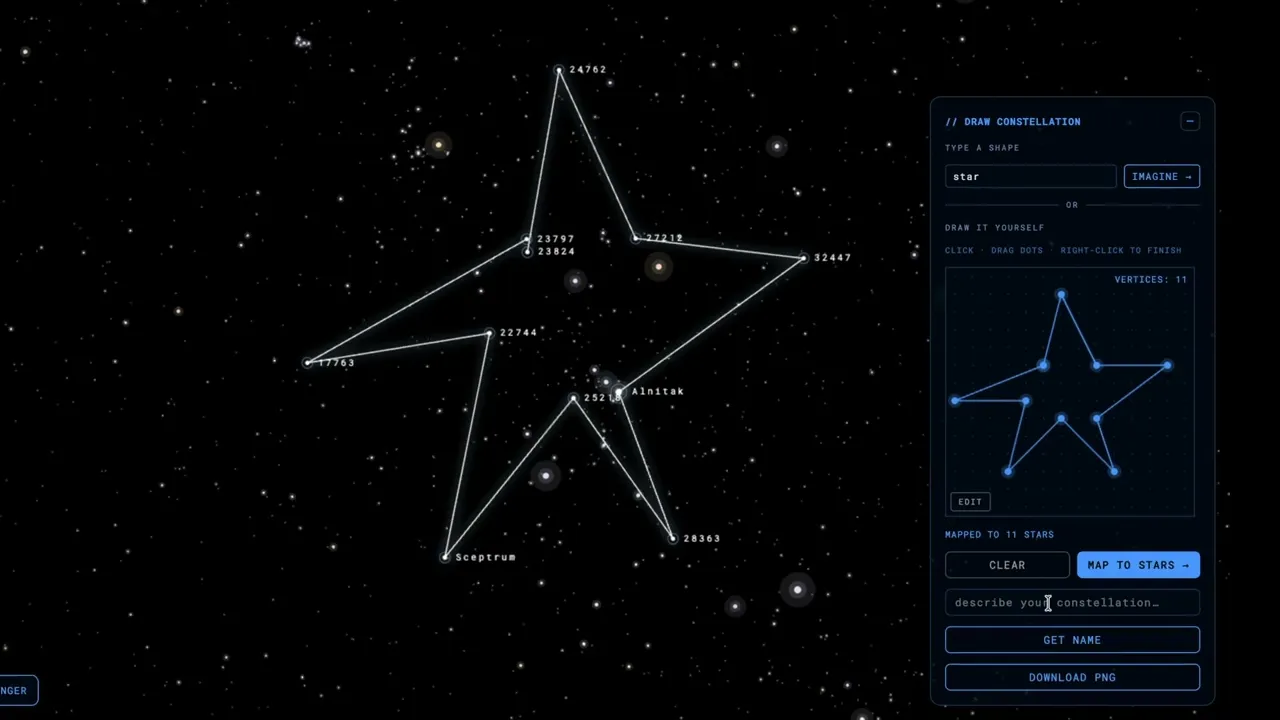
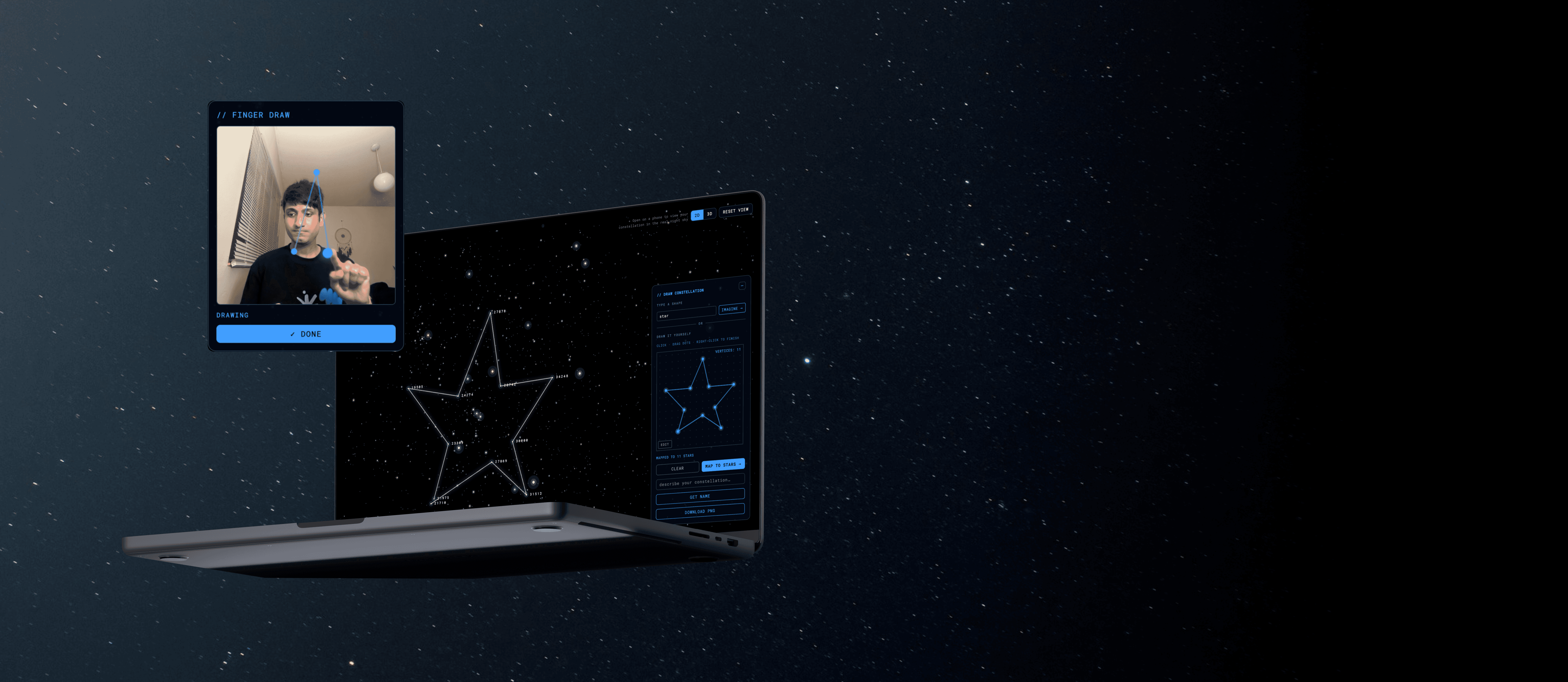
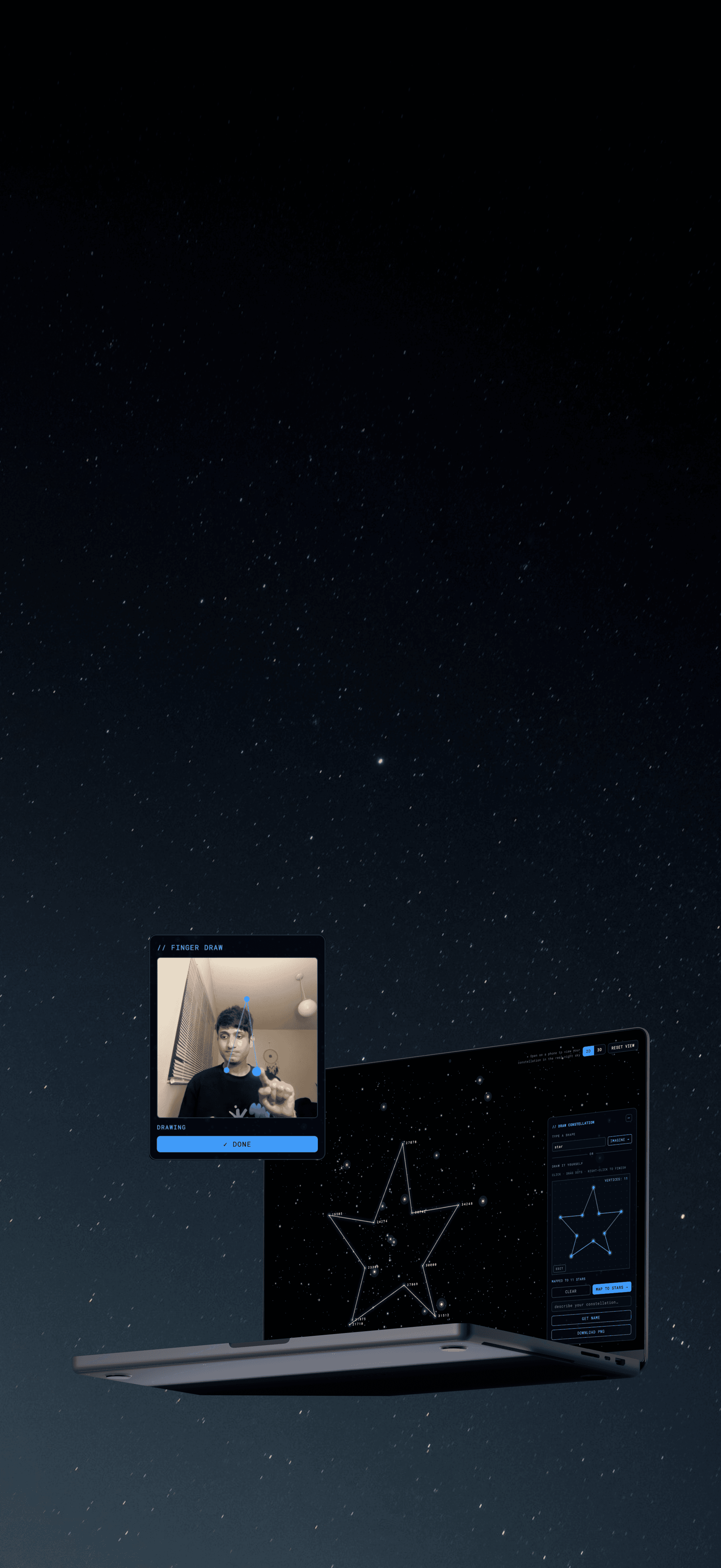
Twinkle lets anyone create a constellation by sketching, typing a prompt, or drawing in the air with their camera. The app matches it to 8,834 real stars, names it with AI, and lets you view it in the night sky on mobile.
My Role

I built Twinkle end-to-end using Lovable, Cursor, and external APIs. From the initial idea and interaction design to the data pipeline, API integrations, testing, and deployment, I was responsible for every part of bringing the product from concept to launch.
Highlights

Highlights
Metrics & Values

Metrics & Values

Final Product
Featured Interactions
Explore a star map built from 8,834 real stars, with size and color based on astronomical data in 2D or 3D.

Sketch a shape manually or draw it yourself and map it to real stars to create a custom constellation.

Type a prompt like “crown,” generate a shape using AI, and name your constellation.

View the constellation that you created in the real sky using mobile and tab AR feature.

Final Product
Featured Interactions
Explore a star map built from 8,834 real stars, with size and color based on astronomical data in 2D or 3D.
Sketch a shape manually or draw it yourself and map it to real stars to create a custom constellation.
Type a prompt like “crown,” generate a shape using AI, and name your constellation.
View the constellation that you created in the real sky using mobile and tab AR feature.
The System
Building the product required understanding how these systems connected, where data lived, what ran locally, and what needed to stay server-side. Working with AI did not remove the need for systems thinking. If anything, it made it more important. Twinkle combines several systems:
Python pipeline
Processes the HYG catalog, filters it to 8,834 visible stars, and precomputes 3D coordinates.
Iconify and Groq API
Provides shape data and powers constellation naming through a server-side function

MediaPipe
Runs at ~60 FPS, using a 3-second hand-size calibration and a 140 ms dwell gesture to place vertices
*Only the AI naming feature makes a server request. Everything else runs locally or uses static data, improving both privacy and performance.*
The System
Building the product required understanding how these systems connected, where data lived, what ran locally, and what needed to stay server-side. Working with AI did not remove the need for systems thinking. If anything, it made it more important. Twinkle combines several systems:
Python pipeline
Processes the HYG catalog, filters it to 8,834 visible stars, and precomputes 3D coordinates.
Iconify and Groq API
Provides shape data and powers constellation naming through a server-side function
MediaPipe
Runs at ~60 FPS, using a 3-second hand-size calibration and a 140 ms dwell gesture to place vertices
*Only the AI naming feature makes a server request. Everything else runs locally or uses static data, improving both privacy and performance.*
Python pipeline
Processes the HYG catalog, filters it to 8,834 visible stars, and precomputes 3D coordinates.
Iconify and Groq API
Provides shape data and powers constellation naming through a server-side function
MediaPipe
Runs at ~60 FPS, using a 3-second hand-size calibration and a 140 ms dwell gesture to place vertices

The Process
Specify
01
Interaction Model First
Constellations are built from straight lines, so I used polylines with discrete vertices instead of freehand curves. This made star matching reliable and reinforced an important lesson: “AI-powered” is not a specification. Precise rules and edge cases are.

02
Next came the Dataset
I initially merged three astronomy datasets, but incorrect correlations meant a hot blue star could inherit the coordinates of a cool red dwarf. I replaced it with the HYG v4.2 catalog, containing 119,626 real stars with correctly linked astronomical data.

03
Building the Python Dataset
Before opening Lovable, I built a Python pipeline that filtered the catalog to 8,834 visible stars, converted right ascension values, generated 3D coordinates, and cleaned missing data. This ensured the star field was ready before development began.

The Process
Specify
01
Interaction Model First
Constellations are built from straight lines, so I used polylines with discrete vertices instead of freehand curves. This made star matching reliable and reinforced an important lesson: “AI-powered” is not a specification. Precise rules and edge cases are.
02
Next came the Dataset
I initially merged three astronomy datasets, but incorrect correlations meant a hot blue star could inherit the coordinates of a cool red dwarf. I replaced it with the HYG v4.2 catalog, containing 119,626 real stars with correctly linked astronomical data.
03
Building the Python Dataset
Before opening Lovable, I built a Python pipeline that filtered the catalog to 8,834 visible stars, converted right ascension values, generated 3D coordinates, and cleaned missing data. This ensured the star field was ready before development began.
Direct
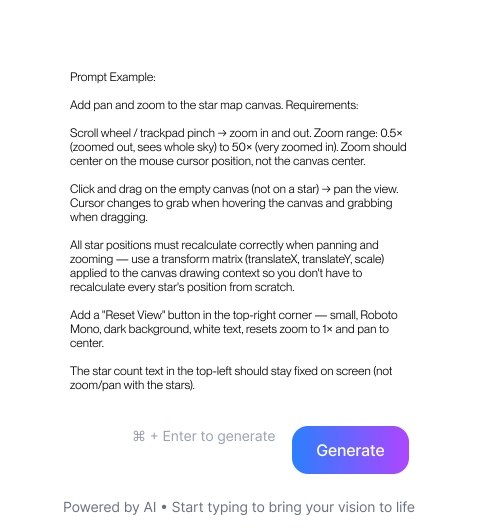
Prompts became the design documents. Every prompt followed the same structure:
Intent
Describes the experience: “When a vertex snaps to a star, the user should feel the sky reaching back.”
Acceptance criteria
Defines success: “Snapping prefers the brighter star on ties, and panning maintains 60fps.”

Constraints
Defined what could not change: “Star colors must follow the existing B-V temperature bands.”

I found that the quality of the output depended directly on the quality of the specification. Vague prompts produced vague results. Precise prompts that defined algorithms, formulas, threshold values, edge cases, visual behavior, and failure states produced features that could actually be shipped.
Writing effective prompts also required understanding the codebase AI was working in. I read the project architecture, identified which files could safely be modified, and understood which configuration files could not be touched without breaking the build.
In traditional product development, designers write specifications and engineers build from them. In this project, the specification and the build instruction were the same document. Writing prompts forced me to communicate with a level of precision that is equally valuable when writing design briefs, engineering tickets, or requirements for teammates.
Direct
Prompts became the design documents. Every prompt followed the same structure:
Intent
Describes the experience: “When a vertex snaps to a star, the user should feel the sky reaching back.”
Acceptance criteria
Defines success: “Snapping prefers the brighter star on ties, and panning maintains 60fps.”
Constraints
Defined what could not change: “Star colors must follow the existing B-V temperature bands.”
I found that the quality of the output depended directly on the quality of the specification. Vague prompts produced vague results. Precise prompts that defined algorithms, formulas, threshold values, edge cases, visual behavior, and failure states produced features that could actually be shipped.
Writing effective prompts also required understanding the codebase AI was working in. I read the project architecture, identified which files could safely be modified, and understood which configuration files could not be touched without breaking the build.
In traditional product development, designers write specifications and engineers build from them. In this project, the specification and the build instruction were the same document. Writing prompts forced me to communicate with a level of precision that is equally valuable when writing design briefs, engineering tickets, or requirements for teammates.
Intent
Describes the experience: “When a vertex snaps to a star, the user should feel the sky reaching back.”
Acceptance criteria
Defines success: “Snapping prefers the brighter star on ties, and panning maintains 60fps.”
Constraints
Defined what could not change: “Star colors must follow the existing B-V temperature bands.”

Evaluate
Every AI output was treated as a draft, not a final answer.
AI-generated features often looked complete before they were actually correct. Every iteration was tested against three questions: Is it astronomically accurate? Is it performant? Does it feel right to use?
A few features failed those checks and had to be redesigned. The value came less from generating solutions and more from evaluating whether those solutions should be kept.

*When something failed, the answer was usually a different tool, not a different prompt.*
Some problems were better solved with datasets, icon libraries, deterministic logic, or calibration math than with a language model. Rewriting prompts could improve results, but choosing the right tool often mattered more. Re-prompting the wrong architecture usually just produces wrong answers faster.
Evaluate
Every AI output was treated as a draft, not a final answer.
AI-generated features often looked complete before they were actually correct. Every iteration was tested against three questions: Is it astronomically accurate? Is it performant? Does it feel right to use?
A few features failed those checks and had to be redesigned. The value came less from generating solutions and more from evaluating whether those solutions should be kept.
*When something failed, the answer was usually a different tool, not a different prompt.*
Some problems were better solved with datasets, icon libraries, deterministic logic, or calibration math than with a language model. Rewriting prompts could improve results, but choosing the right tool often mattered more. Re-prompting the wrong architecture usually just produces wrong answers faster.
Ship
Two weeks into development, I removed plans for user accounts and cloud-saved constellations. A downloadable PNG captured the core value without the complexity of a database backend. The decision clarified what Twinkle actually was: a creative tool, not a social platform.
The final product was deployed on Cloudflare Workers with server-side API security, a custom domain, and installable PWA support.
Link: twinkle.ltd
Ship
Two weeks into development, I removed plans for user accounts and cloud-saved constellations. A downloadable PNG captured the core value without the complexity of a database backend. The decision clarified what Twinkle actually was: a creative tool, not a social platform.
The final product was deployed on Cloudflare Workers with server-side API security, a custom domain, and installable PWA support.
Link: twinkle.ltd

Design Decisions
Decision 1: Polylines over freehand drawing
I chose click-to-place straight segments instead of freehand curves. Real constellations are made from straight lines connecting stars, and discrete points snap cleanly to real star positions. Curved drawings would need to be simplified before matching, which could change the user’s intended shape. The constraint of working with straight-line constellations became part of the aesthetic rather than a limitation.


Before: Manual sketching
After: AI-generated shapes from text prompts
Design Decisions
Decision 1: Polylines over freehand drawing
I chose click-to-place straight segments instead of freehand curves. Real constellations are made from straight lines connecting stars, and discrete points snap cleanly to real star positions. Curved drawings would need to be simplified before matching, which could change the user’s intended shape. The constraint of working with straight-line constellations became part of the aesthetic rather than a limitation.
Before: Manual sketching
After: AI-generated shapes from text prompts
Decision 2: Multiple ways to create a constellation
People approach creativity differently. Some prefer drawing, some have an idea but cannot sketch it, and others enjoy a more physical experience. To support all three, I created three input methods. All three produce the same output and feed into the same constellation-matching system.


Manual sketching
AI-generated shapes from text prompts
Camera-based finger tracking
Decision 2: Multiple ways to create a constellation
People approach creativity differently. Some prefer drawing, some have an idea but cannot sketch it, and others enjoy a more physical experience. To support all three, I created three input methods. All three produce the same output and feed into the same constellation-matching system.
Manual sketching
AI-generated shapes from text prompts
Camera-based finger tracking
Decision 3: 2D first, 3D as a learning tool
I originally explored a fully 3D star field, but constellations quickly became unrecognizable because the stars sit at very different distances from Earth. The main experience uses a 2D sky projection because that is how constellations are actually seen. The 3D view remains as a toggle so users can explore the real depth of the stars and understand why constellations only exist from Earth’s perspective. Some of the stars connected in a constellation can be hundreds of parsecs apart, causing the shape to break apart when viewed in true 3D space.


2D view of constellations
3D view of constellations
Decision 3: 2D first, 3D as a learning tool
I originally explored a fully 3D star field, but constellations quickly became unrecognizable because the stars sit at very different distances from Earth. The main experience uses a 2D sky projection because that is how constellations are actually seen. The 3D view remains as a toggle so users can explore the real depth of the stars and understand why constellations only exist from Earth’s perspective. Some of the stars connected in a constellation can be hundreds of parsecs apart, causing the shape to break apart when viewed in true 3D space.
2D view of constellations
3D view of constellations
Decision 4: Real astronomical data drives the visuals
Every visual property of a star comes from real data. Size is based on apparent brightness using a non-linear scale that better matches how we perceive brightness, while color comes from stellar temperature using the B-V color index. This means stars like Betelgeuse appear orange-red and Rigel appears blue-white because that is how they actually look. The visual style is derived directly from the data rather than added on top of it.

Decision 4: Real astronomical data drives the visuals
Every visual property of a star comes from real data. Size is based on apparent brightness using a non-linear scale that better matches how we perceive brightness, while color comes from stellar temperature using the B-V color index. This means stars like Betelgeuse appear orange-red and Rigel appears blue-white because that is how they actually look. The visual style is derived directly from the data rather than added on top of it.
Decision 5: Canvas over SVG
The star field contains 8,834 stars, each rendered with glow effects. SVG would have created thousands of DOM elements and hurt performance, so I used HTML5 Canvas for rendering and Three.js for the 3D view. This allowed the experience to stay smooth while maintaining the visual quality I wanted. The rendering technology directly affected the visual quality of the experience, so design and technical decisions had to be made together.


Decision 5: Canvas over SVG
The star field contains 8,834 stars, each rendered with glow effects. SVG would have created thousands of DOM elements and hurt performance, so I used HTML5 Canvas for rendering and Three.js for the 3D view. This allowed the experience to stay smooth while maintaining the visual quality I wanted. The rendering technology directly affected the visual quality of the experience, so design and technical decisions had to be made together.
Decision 6: Building and shipping efficiently
I chose Lovable because the project relied heavily on visual iteration, allowing me to quickly test and refine ideas. I also cut user accounts and cloud-saved constellations from the original plan, replacing them with simple PNG downloads. This kept the focus on the core experience of creating constellations rather than building a social platform and helped get the product shipped faster.
Decision 6: Building and shipping efficiently
I chose Lovable because the project relied heavily on visual iteration, allowing me to quickly test and refine ideas. I also cut user accounts and cloud-saved constellations from the original plan, replacing them with simple PNG downloads. This kept the focus on the core experience of creating constellations rather than building a social platform and helped get the product shipped faster.

Where the AI Was Wrong
AI always produced something plausible. My job was determining whether it was actually correct and redesigning the solution when it wasn’t.

AI could describe a shape, but not draw one
Problem: LLM-generated coordinates produced random, unrecognizable shapes.
Root Cause: Language models are not reliable geometry engines.
Decision: Switched to Iconify’s library of 275,000 SVG icons and converted paths into vertices. AI handled the search query while geometry came from human-designed icons.

A feature that worked once wasn’t good enough
Problem: Google’s Quick Draw dataset suffered from CORS issues, 50–300MB files, 2–8 second response times, and occasional failures.
Root Cause: The system was technically functional but not reliable enough for a creative tool.
Decision: Replaced Quick Draw with Iconify, reducing response times to under 500ms

AI-generated code got me to 80%
Problem: Finger tracking created vertices from small hand tremors.
Root Cause: A fixed pixel threshold doesn’t account for distance from the camera.
Decision: Added a 3-second calibration step using MediaPipe palm measurements to dynamically scale the threshold.
Where the AI Was Wrong
AI always produced something plausible. My job was determining whether it was actually correct and redesigning the solution when it wasn’t.
AI could describe a shape, but not draw one
Problem: LLM-generated coordinates produced random, unrecognizable shapes.
Root Cause: Language models are not reliable geometry engines.
Decision: Switched to Iconify’s library of 275,000 SVG icons and converted paths into vertices. AI handled the search query while geometry came from human-designed icons.
A feature that worked once wasn’t good enough
Problem: Google’s Quick Draw dataset suffered from CORS issues, 50–300MB files, 2–8 second response times, and occasional failures.
Root Cause: The system was technically functional but not reliable enough for a creative tool.
Decision: Replaced Quick Draw with Iconify, reducing response times to under 500ms
AI-generated code got me to 80%
Problem: Finger tracking created vertices from small hand tremors.
Root Cause: A fixed pixel threshold doesn’t account for distance from the camera.
Decision: Added a 3-second calibration step using MediaPipe palm measurements to dynamically scale the threshold.

Challenges & Reflection
01
Direction became the craft
AI made execution faster, but it moved the difficulty upstream. The quality ceiling of the project was set by the clarity of my specifications, not the capability of the model. Defining intent, constraints, and success criteria became more important than producing screens.
02
Judgment doesn’t automate
Many outputs looked correct but weren’t. The real work was identifying what was wrong, deciding what to redesign, and knowing what to cut. I wasn’t shipping AI outputs. I was shipping decisions.
03
Simplicity is a feature
One of the best decisions was removing features. Cutting accounts, databases, and cloud-saved constellations kept the focus on the core experience. A creative tool that works well is more valuable than a platform filled with unnecessary complexity.
Twinkle taught me that vibecoding does not remove the designer from the process. It moves the designer’s skill from Figma to language. Because I couldn’t course-correct in real time, I had to be much more precise about what I wanted before asking for it.
The skill I developed was directed AI development: understanding the technology well enough to write specifications it can execute, understanding the product well enough to spot when an output is subtly wrong, and understanding users well enough to make decisions that AI cannot make for you.
*Humans have always drawn imaginary lines between real stars. Twinkle lets them draw their own.*
Challenges & Reflection
01
Direction became the craft
AI made execution faster, but it moved the difficulty upstream. The quality ceiling of the project was set by the clarity of my specifications, not the capability of the model. Defining intent, constraints, and success criteria became more important than producing screens.
02
Judgment doesn’t automate
Many outputs looked correct but weren’t. The real work was identifying what was wrong, deciding what to redesign, and knowing what to cut. I wasn’t shipping AI outputs. I was shipping decisions.
03
Simplicity is a feature
One of the best decisions was removing features. Cutting accounts, databases, and cloud-saved constellations kept the focus on the core experience. A creative tool that works well is more valuable than a platform filled with unnecessary complexity.
Twinkle taught me that vibecoding does not remove the designer from the process. It moves the designer’s skill from Figma to language. Because I couldn’t course-correct in real time, I had to be much more precise about what I wanted before asking for it.
The skill I developed was directed AI development: understanding the technology well enough to write specifications it can execute, understanding the product well enough to spot when an output is subtly wrong, and understanding users well enough to make decisions that AI cannot make for you.
*Humans have always drawn imaginary lines between real stars. Twinkle lets them draw their own.*
Opportunity Area
For thousands of years, people have imagined shapes between the stars. Twinkle turns that instinct into something interactive: you imagine a shape, draw it, and real astronomical data brings it to life.
Twinkle lets anyone create a constellation by sketching, typing a prompt, or drawing in the air with their camera. The app matches it to 8,834 real stars, names it with AI, and lets you view it in the night sky on mobile.
My Role
I built Twinkle end-to-end using Lovable, Cursor, and external APIs. From the initial idea and interaction design to the data pipeline, API integrations, testing, and deployment, I was responsible for every part of bringing the product from concept to launch.
Let’s create something meaningful together.
rachitsinghi2001@gmail.com
Copy to clipboard



Let’s create something meaningful together.
rachitsinghi2001@gmail.com
Copy to clipboard